 11
11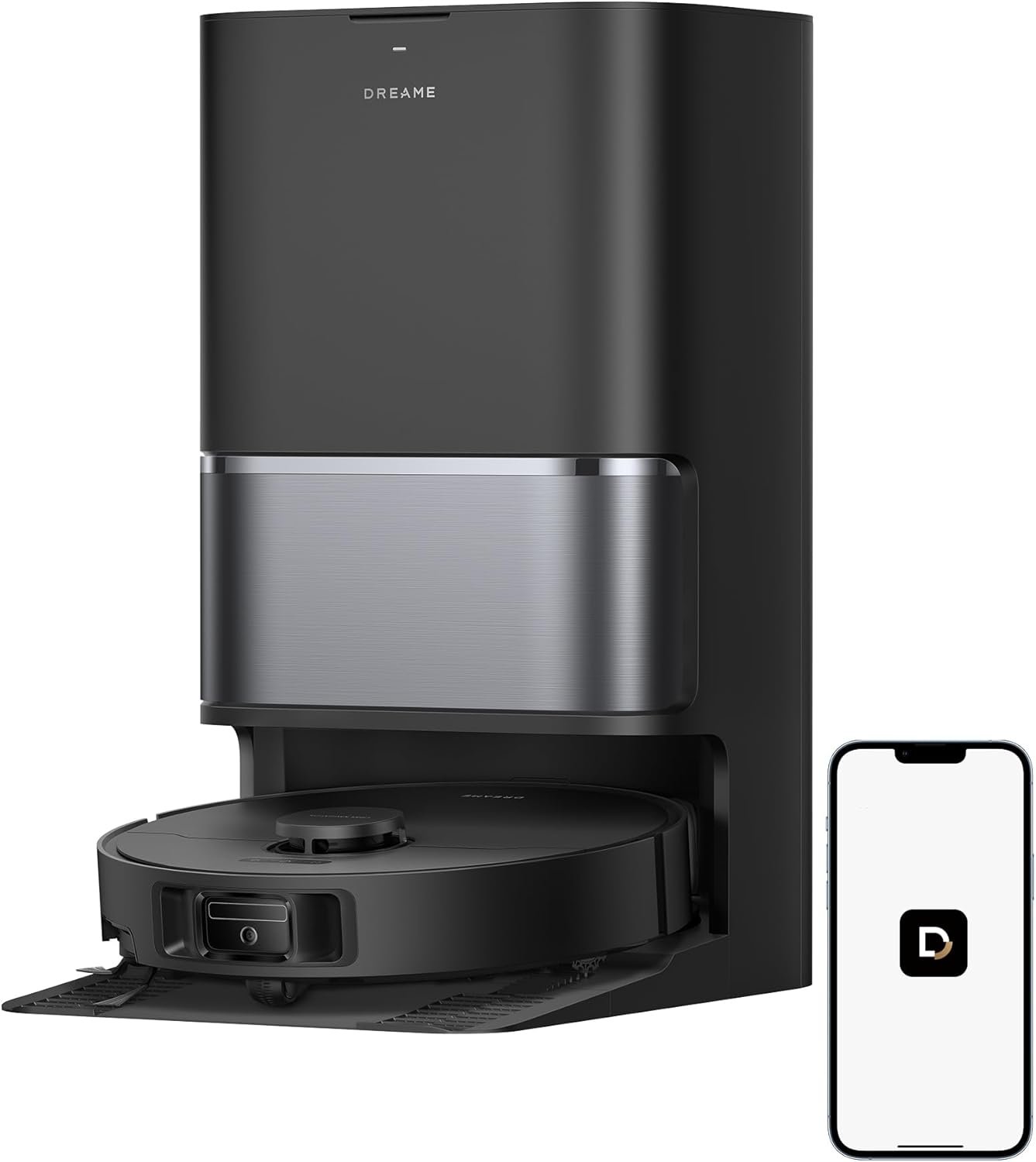
Keeping floors clean has always been one of those household tasks that never truly ends. Dust reappears within hours, pet hair seems to multiply overnight, and mopping often feels like a chore reserved for weekends. Robot vacuum and mop combos have changed this dynamic significantly over the past few years, and the Dreame L40 Ultra Gen 2 represents one of the more advanced entries in this growing category of home cleaning technology.
This article takes a closer look at what this device offers, how it fits into everyday life, and what potential buyers should think about before adding one to their home. Rather than focusing on sales language, the goal here is to provide a grounded, educational overview of the product’s design, functionality, and practical applications.
The robot vacuum market has matured considerably since the early days of simple bump-and-turn cleaning bots. Today’s flagship models, including the Dreame L40 Ultra Gen 2, combine vacuuming and mopping into a single automated system, supported by a self-emptying and self-cleaning dock. This particular model is built around a 25,000Pa suction rating, which places it among the higher-powered options currently available for home use.
Beyond raw suction power, the L40 Ultra Gen 2 incorporates features like an extendable side brush and mop, voice and app-based control, and an all-in-one maintenance station designed to reduce the amount of manual upkeep required. For households juggling busy schedules, pets, or larger living spaces, this kind of automation can meaningfully change how floor care fits into daily routines.
It’s worth noting that no robotic cleaning device is a complete replacement for occasional deep cleaning or manual attention to specific problem areas. However, understanding what this type of appliance is designed to do—and how it’s meant to be used—can help set realistic expectations for anyone considering this category of product.
Suction strength is one of the most commonly referenced specifications in the robot vacuum world, and for good reason. Higher suction generally translates to better performance on carpets, more effective pickup of fine dust and debris, and improved handling of pet hair. A 25,000Pa rating positions this model toward the upper end of consumer robot vacuums currently on the market, which may be particularly relevant for homes with mixed flooring types or higher shedding pets.
One of the more distinctive design elements of this model is its extendable side brush and mop mechanism. Traditional robot vacuums often struggle with corners and edges, since their circular or square chassis designs aren’t always well-suited to reaching tight spaces along baseboards or furniture legs. An extendable arm system is designed to physically reach into these edges, potentially reducing the amount of manual touch-up cleaning needed in hard-to-reach areas.
Similarly, an extendable mop can allow the unit to bring damp cleaning closer to wall edges and corners, areas that fixed-mop designs sometimes miss entirely.
Perhaps one of the more appealing aspects of this generation of robot vacuums is the dock system itself. Rather than requiring a person to manually empty a dustbin after every cleaning cycle, the dock automatically empties collected debris into a larger onboard container, which typically needs attention only every few weeks depending on usage and household size.
In addition to debris collection, the dock is also designed to clean the mop pads after each mopping session, using water (and in some setups, hot water or drying cycles) to rinse away grime before the pads are used again. This kind of maintenance automation is a significant shift from earlier generations of robot vacuums, where mop pads had to be removed and washed by hand.
Connectivity has become a standard expectation for smart home devices, and this model supports both voice command integration and a dedicated smartphone app. Through the app, users can typically schedule cleaning sessions, set up virtual boundaries or no-go zones, monitor cleaning maps, and adjust suction or mopping intensity for different rooms.
Voice control, when paired with compatible smart home ecosystems, allows for hands-free operation—useful for starting a cleaning session while cooking, working, or simply relaxing without needing to reach for a phone.
Modern robot vacuums in this tier generally rely on LiDAR or similar laser-based navigation systems combined with onboard sensors to build a real-time map of the home. This allows the device to clean in efficient patterns, avoid obstacles, and remember room layouts across multiple cleaning sessions. Multi-floor mapping is also common in this class of device, letting users save layouts for different levels of a home.
Robot vacuums like the L40 Ultra Gen 2 are designed to fit into a variety of household routines rather than serving a single narrow purpose. Here are some practical ways this type of device tends to be used:
Daily maintenance cleaning. Many households set up a recurring schedule so the vacuum runs once a day, often while residents are at work or asleep, keeping floors consistently free of light dust, crumbs, and pet hair.
Targeted room cleaning. Through app-based room selection, users can direct the device to clean specific areas—such as a kitchen after a meal or a living room before guests arrive—without running a full-home cycle.
Pet hair management. Homes with shedding pets often benefit from the combination of strong suction and frequent automated cleaning cycles, since pet hair tends to accumulate quickly between manual vacuuming sessions.
Mixed-flooring homes. Because the device handles both vacuuming and mopping, it can transition between carpeted and hard-flooring areas within a single session, adjusting cleaning mode as needed.
Reducing manual upkeep. The self-emptying and self-cleaning dock is particularly useful for people who want to minimize the number of times they need to interact with the vacuum itself, whether due to time constraints, mobility considerations, or simply personal preference.
Voice-activated quick cleans. For moments when a spill or mess happens unexpectedly, voice commands can allow for a fast response without needing to locate the app.
While robot vacuums have broad appeal, certain households may find this particular model more relevant to their needs than others.
That said, this may not be the ideal fit for every household. Homes with a lot of loose cables, low-hanging furniture, or delicate objects on the floor may require additional setup or furniture rearrangement to avoid navigation issues. Similarly, very small living spaces might not need the full range of features offered by a higher-end model like this one.
Robot vacuums perform best in homes where floors are relatively clear of clutter. Loose cords, scattered toys, or low furniture with limited clearance can interfere with navigation or cause the unit to get stuck. Taking a few minutes to tidy up before each cleaning cycle is often recommended, especially during the first few weeks of use as the device learns your home’s layout.
Although the self-emptying and self-cleaning dock significantly reduces manual maintenance, it doesn’t eliminate it entirely. Users will still need to periodically empty the larger dust bag or bin, refill clean water tanks, empty dirty water tanks, and occasionally check brushes and filters for buildup. Understanding this maintenance rhythm ahead of time can help set realistic expectations.
Higher suction power can sometimes correlate with increased noise during operation, particularly on maximum settings. If noise is a concern—for example, in homes with light sleepers or home offices—it may be worth reviewing available sound specifications or considering scheduling cleaning sessions during hours when noise is less disruptive.
Mopping robots typically include sensors or settings designed to avoid soaking carpets with water, but users with carpeted homes should still review how the mopping function interacts with different flooring types. Some models allow users to set no-mop zones for carpeted areas to prevent unwanted moisture exposure.
Since voice and app control are central features of this device, it’s worth confirming compatibility with existing smart home ecosystems, such as voice assistants already in use at home. This can help ensure a smoother integration process from the start.
All-in-one docks tend to be larger than the simple charging docks seen in older robot vacuum generations, since they house water tanks, dust collection bags, and sometimes drying mechanisms. Planning for adequate space—ideally near an accessible outlet—can make daily use more convenient.
To put the L40 Ultra Gen 2 into context, it can help to understand how different categories of robot vacuums generally compare, without focusing on any specific competing brand or model.
Basic robot vacuums typically offer straightforward suction-only cleaning with limited navigation and no mopping functionality. These are often more budget-friendly and suitable for smaller spaces or simpler cleaning needs.
Vacuum-and-mop combo units without self-cleaning docks add the ability to mop floors but usually still require manual removal, washing, and reattachment of mop pads, along with manual dustbin emptying after each session.
All-in-one systems with self-emptying and self-cleaning docks, like the L40 Ultra Gen 2, represent a more advanced tier. These systems aim to minimize daily hands-on interaction by automating both debris collection and mop maintenance, often paired with stronger suction, more advanced navigation, and expanded app functionality.
Each category serves different needs and budgets, and the right choice often depends on household size, flooring types, pet ownership, and how much manual involvement a person is comfortable with when it comes to appliance maintenance.
Does this robot vacuum work well on both carpet and hard flooring? Devices in this suction tier are generally designed to handle mixed flooring, often using sensors to detect surface type and adjust suction or mopping behavior accordingly. Specific performance can vary based on carpet pile height and floor material.
How often does the self-emptying dock need to be maintained? This depends on household size and usage frequency, but many self-emptying systems are designed to hold several weeks’ worth of debris before requiring a bag change, while water tanks for mopping functions typically need more frequent attention, often every few cleaning cycles.
Can it be controlled without a smartphone? Voice control features often allow for basic commands, such as starting or pausing a cleaning session, without needing to open an app. However, more detailed settings like scheduling or zone mapping typically require the companion app.
Is it suitable for homes with multiple pets? Homes with pets often benefit from higher suction ratings and automated cleaning schedules, since pet hair tends to accumulate quickly. That said, very heavy shedding may still require occasional manual vacuuming in addition to robotic cleaning.
Does the mop function get floors excessively wet? Mopping robots are generally designed to apply a controlled amount of moisture rather than saturating floors, and many include settings to adjust water flow or avoid mopping over carpeted areas entirely.
Will it work in a multi-level home? Multi-floor mapping is a common feature in this class of device, allowing users to save different layouts for each level. However, the robot itself typically needs to be manually carried between floors unless multiple docks are used.
The Dreame L40 Ultra Gen 2 reflects how far robot vacuum technology has advanced in a relatively short period of time. With strong suction power, an extendable side brush and mop system designed for edge cleaning, and an all-in-one dock that handles both debris collection and mop maintenance, it represents a more automated approach to everyday floor care.
Like any smart home appliance, its suitability depends on individual household needs—layout, flooring type, pet ownership, and personal preferences around maintenance and technology integration all play a role in determining whether this kind of device fits well into a particular home. Taking time to understand these factors beforehand can help set realistic expectations and lead to a smoother experience overall.