 11
11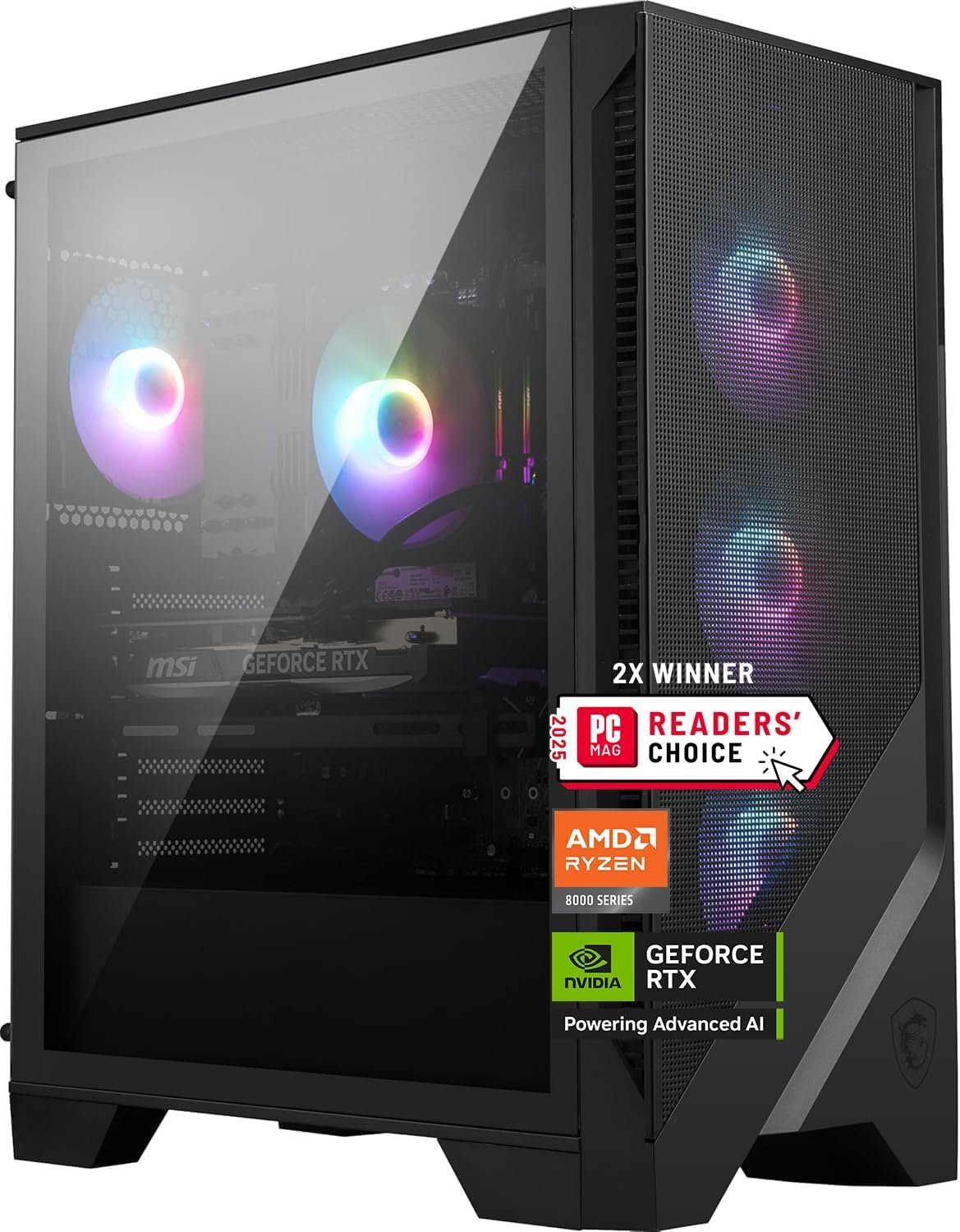
Building or buying a gaming PC often comes down to a simple question: how much time do you want to spend researching individual components versus getting a machine that’s already been assembled, tested, and optimized to work together? Pre-built gaming desktops have come a long way in recent years, and the MSI Codex Z2 represents one of the more capable options in this space, pairing a modern AMD processor with an RTX 5070 graphics card in a package aimed at both gaming and general high-performance computing.
This article walks through what this particular configuration includes, how it might fit into different use cases, and what points are worth considering before deciding whether it aligns with your needs.
The MSI Codex Z2, specifically the A8NVP-436US configuration, combines an AMD Ryzen 7 8700F processor with an NVIDIA GeForce RTX 5070 graphics card, 32GB of DDR5 memory, and a 2TB M.2 NVMe SSD. Together, these components form a system aimed at handling modern gaming titles, content creation tasks, and general everyday computing without requiring the buyer to source and assemble individual parts.
Pre-built systems like this one appeal to a wide range of users, from people upgrading from older hardware to those building their first dedicated gaming setup. The Codex Z2 also includes VR readiness and USB Type-C connectivity, both of which reflect an effort to keep the machine relevant for a few years rather than just meeting today’s baseline requirements.
Rather than positioning this as a superlative “best in class” machine, it’s more useful to think of it as a well-rounded mid-to-upper-tier gaming desktop that balances performance, storage, and connectivity in a single enclosure.
The Ryzen 7 8700F is part of AMD’s 8000 series lineup, built to handle multi-threaded workloads efficiently. This makes it well-suited not just for gaming, but also for tasks like video editing, streaming, and running multiple applications simultaneously. A processor in this tier generally provides enough headroom for demanding games while leaving resources available for background tasks like Discord, browser tabs, or recording software.
The RTX 5070 sits in NVIDIA’s more recent generation of graphics cards, built on architecture designed to improve ray tracing performance and AI-assisted rendering technologies such as DLSS (Deep Learning Super Sampling). For gamers, this generally translates into smoother frame rates at higher resolutions, along with better handling of graphically intensive effects like reflections, shadows, and lighting.
Beyond gaming, GPUs in this class are also commonly used for tasks like 3D rendering, machine learning experimentation, and video editing software that relies on GPU acceleration.
Memory capacity plays a significant role in how well a system handles multitasking and increasingly demanding game engines. 32GB of DDR5 RAM provides a comfortable margin for running modern AAA titles alongside background applications, without needing to immediately worry about memory bottlenecks. DDR5, as the newer memory standard, also offers improved bandwidth compared to older DDR4 modules, which can contribute to overall system responsiveness.
Storage speed and capacity are often overlooked until they become a limitation. This system includes a 2TB M.2 NVMe SSD, which is considerably faster than traditional SATA SSDs or mechanical hard drives. Faster storage means quicker boot times, reduced game loading screens, and snappier file transfers. With modern game installations often exceeding 50-100GB each, having 2TB of space provides meaningful room for a substantial game library, along with software and personal files.
The inclusion of USB Type-C ports reflects an effort to keep the system compatible with newer peripherals and accessories, many of which have shifted toward this connector standard. USB-C often supports faster data transfer speeds and, depending on implementation, can also handle video output or higher power delivery, which is useful for connecting newer monitors, external drives, or docking accessories.
Being labeled as VR-ready generally means the combination of CPU and GPU meets the performance thresholds required by virtual reality headset manufacturers. This can be particularly relevant for anyone interested in exploring VR gaming or applications, since underpowered systems often struggle to maintain the frame rates necessary for a comfortable VR experience.
The system comes with Windows 11 Home pre-installed, providing an out-of-the-box experience without requiring a separate operating system purchase or installation process. Windows 11 includes features like improved window management, Xbox Game Bar integration for recording and streaming, and general compatibility with the vast majority of PC games and productivity software.
While marketed primarily as a gaming desktop, the practical applications of a system like this extend well beyond gaming alone.
Modern AAA gaming. With a Ryzen 7 processor and RTX 5070 graphics card, this system is generally positioned to handle current-generation titles at solid settings, particularly at 1440p resolution, and potentially 4K depending on the specific game and desired frame rate targets.
Content creation and streaming. The combination of multiple CPU cores and a capable GPU can support video editing, live streaming, and recording gameplay simultaneously, which is often demanding on both processing power and memory.
Virtual reality applications. Given its VR-ready certification, this desktop can serve as a base system for VR gaming or applications, assuming a compatible headset is connected separately.
General productivity. Beyond gaming-specific tasks, the system’s specifications are more than capable of handling everyday computing needs such as web browsing, document editing, spreadsheet work, and running multiple applications at once.
Creative software and 3D work. Programs like Blender, Adobe Premiere, or similar GPU-accelerated software can benefit from the RTX 5070’s processing capabilities, making this system potentially useful for hobbyist or semi-professional creative work.
Home office or hybrid setups. With USB-C connectivity and strong multitasking capability, the machine could also double as a home workstation for people who want a single desktop capable of handling both work and entertainment needs.
Given its specifications, the MSI Codex Z2 in this configuration may appeal to several types of users:
That said, casual users whose primary needs are web browsing, email, and basic office tasks may find this system’s gaming-oriented specifications more than what they require, and could be better served by a simpler, more budget-conscious setup.
A gaming desktop’s performance potential can only be fully realized when paired with a monitor capable of displaying higher refresh rates and resolutions. Buyers should consider whether their existing monitor supports the resolution and frame rates this system is capable of producing, or whether a monitor upgrade might be worth factoring into the overall setup.
Gaming desktops, particularly those built for higher-performance components, often come in larger cases designed to accommodate cooling systems and airflow. It’s worth checking the physical dimensions of the case against the intended desk or setup space before purchasing.
While pre-built systems are convenient, it’s worth understanding which components are user-upgradable down the line, such as additional storage drives, memory modules, or potential GPU upgrades in future years. This can extend the system’s usable lifespan as software requirements evolve.
Higher-performance graphics cards typically require adequate power supply wattage and, in some cases, dedicated electrical considerations for the space where the desktop will be used. Checking the included power supply specifications against your intended usage can help avoid future bottlenecks, particularly if additional components are added later.
As with most gaming PCs, staying current with GPU drivers and Windows updates is generally recommended to maintain optimal performance and compatibility with newer game releases. This is typically a straightforward process but is worth factoring into ongoing system maintenance expectations.
Higher-performance components often generate more heat, which in turn affects cooling fan behavior and noise levels during demanding tasks. Buyers sensitive to fan noise may want to research the specific cooling solution included with this model, or consider whether additional case fans or a different cooling configuration might be desirable over time.
Understanding how this system fits within the broader gaming desktop market can help clarify expectations.
Entry-level gaming desktops typically include lower-tier graphics cards and processors, suitable for less demanding games at lower resolutions or settings. These systems tend to be more budget-conscious but may require more frequent upgrades to keep pace with newer game requirements.
Mid-to-upper-tier systems, like the Codex Z2 configuration discussed here, generally offer a stronger balance of processing power, graphics capability, and storage, making them suitable for handling most current games at higher settings and resolutions, along with light-to-moderate content creation work.
High-end or enthusiast-level systems often include top-tier graphics cards, additional storage drives, and more elaborate cooling systems, aimed at users seeking maximum performance for 4K gaming, professional content creation, or competitive esports scenarios at the highest possible frame rates.
Each category serves different needs and budgets, and the right choice ultimately depends on the specific games or software you plan to run, your display’s resolution and refresh rate, and how much future-proofing you’re looking for in a system.
Is this desktop suitable for 4K gaming? The RTX 5070 is generally capable of handling many titles at 4K resolution, though actual performance will vary depending on the specific game, graphics settings, and whether features like DLSS are utilized. For consistently high frame rates at 4K in the most demanding titles, some users may need to adjust settings accordingly.
Can the storage or memory be upgraded later? Many pre-built desktops, including systems in this class, typically allow for additional storage drives or memory upgrades, though the ability to do so can depend on the specific case design and motherboard configuration. Checking official specifications or documentation is recommended before planning any upgrades.
Does this system support virtual reality headsets? Yes, the system is marketed as VR-ready, meaning its CPU and GPU combination generally meets the performance requirements set by major VR headset manufacturers. A separate VR headset would still need to be purchased, as it is not included with the desktop.
What kind of games can this system handle well? Given the Ryzen 7 8700F processor and RTX 5070 graphics card, this system is generally well-positioned to handle most current AAA titles, particularly at 1440p resolution, along with many esports titles at very high frame rates.
Is Windows 11 Home sufficient, or should I upgrade to Windows 11 Pro? Windows 11 Home covers most personal and gaming use cases effectively. Windows 11 Pro includes additional features often geared toward business environments, such as advanced security tools and remote desktop capabilities, which may not be necessary for typical gaming or personal use.
How does USB-C benefit a gaming setup specifically? USB-C ports can offer faster data transfer speeds for external drives, and depending on the specific port implementation, may also support video output or accessory charging, which can be useful for modern peripherals, docking stations, or certain monitor connections.
The MSI Codex Z2 (A8NVP-436US) brings together a capable combination of components—an AMD Ryzen 7 8700F processor, RTX 5070 graphics card, 32GB of DDR5 memory, and a spacious 2TB NVMe SSD—into a pre-built package designed to handle modern gaming, content creation, and general computing tasks without requiring manual assembly.
As with any gaming desktop purchase, the right fit depends on your specific use case, existing peripherals, and expectations around performance at your preferred resolution and settings. Taking time to consider monitor compatibility, available space, and future upgrade paths can help ensure the system aligns well with your particular needs.